Action
The action dashlet is a collection of links as a list. The click on a list item opens the target.
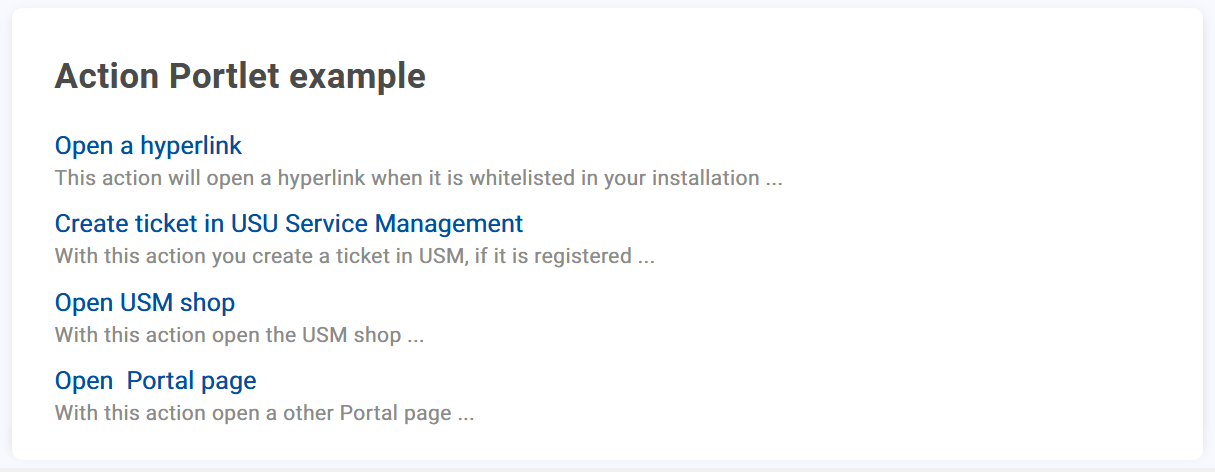
In addition to the general attributes, you have the following configuration options:
Title Language/Translation | Select the language and the corresponding translation of the Title of your actions. Confirm your entry with |
Question Language/Translation | Select the language and the corresponding translation of the question. This question and the answer (description) defined is displayed when the end user clicks on the Confirm your entry with |
Description Language/Translation | Select the language and the corresponding translation of the description. This description is the answer to the previously defined question. Confirm your entry with |


You can add several language versions for the defined title, question and description.
To remove a language version, click on  .
.
Actions
In this section, existing actions are displayed as a list. You have the following options:
Rearrange the actions via drag and drop. |
Opens the edit menu for the action. The configuration of an action is described in the following section. |
Deletes the action. |


To add a new action, click on + Add.
You have the following options available:
Title Language/Translation | Select the language and the corresponding translation of the title. The title is the displayed link text. Confirm your entry with |
Subtitle Language/Translation | Select the language and the corresponding translation of the subtitle. The subtitle is displayed below the link text. Confirm your entry with |
Link Type
Depending on the selected type you have to define additional attributes.
Drawer:Object ID
Add the Object ID
Drawer width
Define the width of the drawer.
Page ID:Page ID
Select the portal page using the drop down menu.
New tab: This opens a defined target link in a new tab.Scriptproduces a runlink to USU Service Management or USU Shop.Notice
For a runlink it is also possible to use interpolation strings. For example
${[item].[details].[guid]}as part of a Shop runlink.Current Tab: This opens the defined target link in the current tab.Action: Used to to address an adapter, for example to trigger the call of a web service.
For Script, New tab, Current tab and Action you have the following attributes available:
Target | Add the target URL/path of the resource and define the request method. |
Method |
|
Body Params/Body Edtior | NoticeThe field is only available when the target method
|
To save your configuration click on Apply or Cancel the process.