USU central helm chart and docker image registry
The apps that you buy from USU GmbH come as an external digital content that you can download, install, or reinstall. After you purchase the software, you get an access to the Nexus repository. This is a registry of all USC packages where you can install your apps from. To find a specific download, you need to sign in with the Nexus account, find your app and download the package with all the apps you have bought and you want to install.
Steps to take to find and download your app:
Your Administrator gets a unique login credentials for your user into the Nexus repository: USU.
Alternatively, please ask USU Support or contact us by email for a PULL user to access the account.
After you log in, you can see various installation packages for USU Software composes.
Pick the correct package.
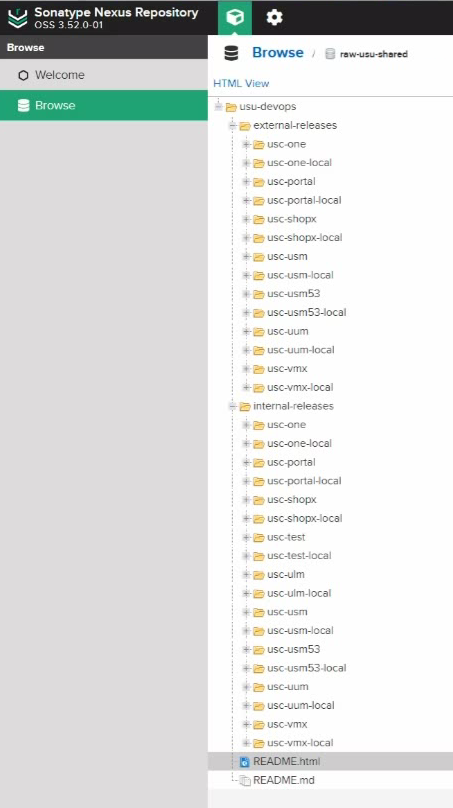
Note that there are two types of releases:
External - Production releases
Internal - Pre-releases intended for internal USU use
A README file is generated down below the list.
Open the file and find what specific package is relevant for your installation.
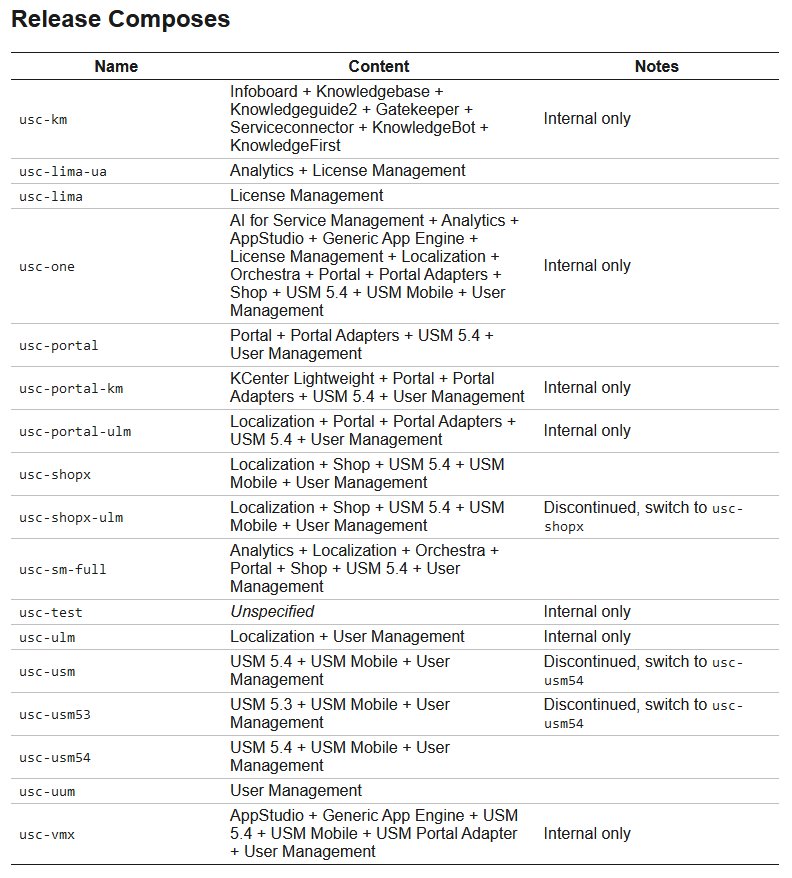
Note
The README file is updated and modified on regular basis. Please always check that you have the latest version.
Note that there are two release variants:
Default - For cloud and server installations on Linux platform
*-local - For local laptop installations on Windows/Linux platform (demos, trainings etc.)
Download the package.
The package also contains other README files which contain a detailed set of instructions on how to proceed with the installation of this particular package´s content. Note that you can find detailed version info of each application in the readme file.
For details, jump to USC installation process.