Knowledge Center documents
Knowledge Center (KC) is a central repository of documents which provide you with an easy access to the frequently used solution descriptions.
Note
Knowledge Center documents are only available if your company uses USU Knowledge Center and if it is connected to the Self-Service Portal.
To search for the Knowledge Center documents by a specific term:
Start typing your search term in the search bar.
Matching results will appear instantly in the search result window below.
Scroll down to the KC Documents category within the search results.
Locate and select the relevant KC document that matches your query.
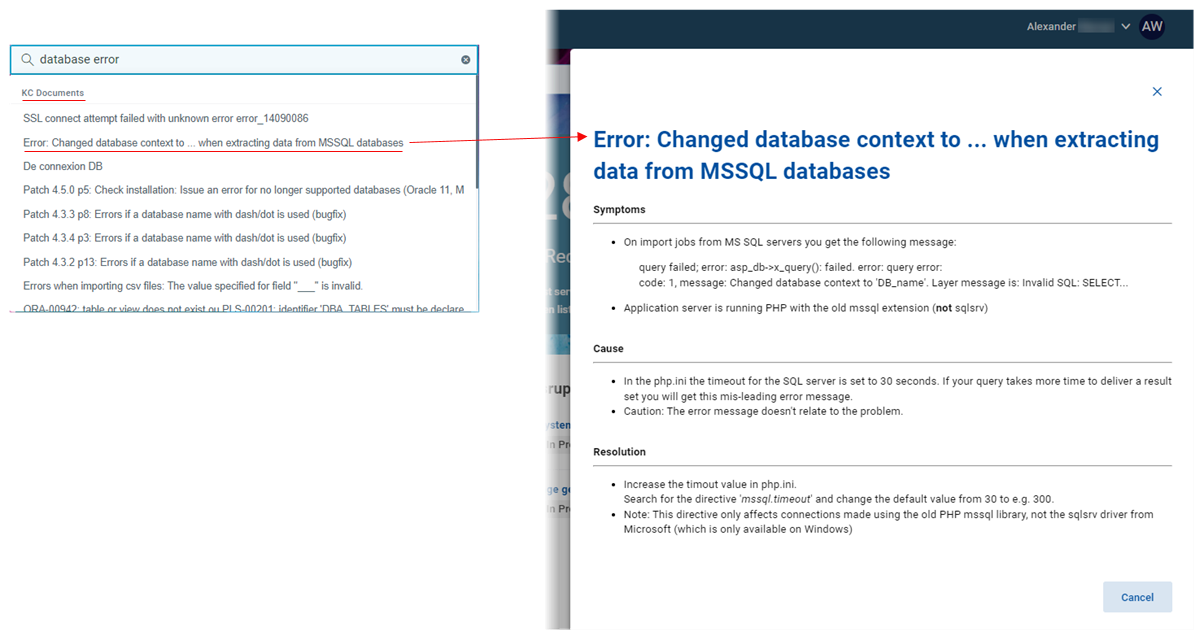
Click the document to open it.
The selected document appears in a drawer on the right side of the screen.
If the KC document does not resolve your issue (see above), you can create a ticket directly from the same view:
Click the Create Ticket button located within the document drawer.
The Create Ticket dialog opens, allowing you to submit your support request.
If the KC document is an active document - such as a guided form with checklists or decision trees - your answers and selections are automatically captured during your interaction.
When you click Create Ticket from an active document:
Your previous inputs - such as selected options or completed steps - are automatically transferred into the Ticket Description.
This saves time and ensures that the support team receives all relevant context without requiring you to re-enter the information.