Navigation menu
The expandable vertical menu on the left side typically contains two default items as part of standard functionality: Home and Tickets. With the installation of the Self-Service Portal, additional items like Manager self-service, Example pages and Use Cases are included in the USU standard package. Please note that the menu structure can be customized by the administrator for each specific customer.
Note
The toolbar and the navigation menu are not specific to the Welcome Page but are instead fundamental components of the Portal and are always accessible.
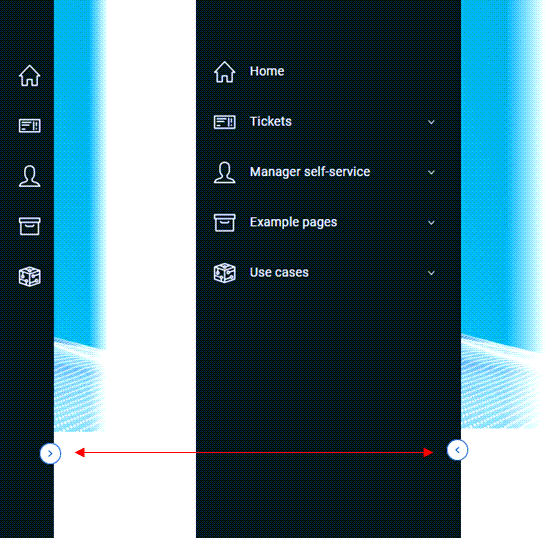
Possible actions:
Click the arrow symbol on the vertical line to expand and collapse the menu panel.
Home | Directs you to the starting point of the Self-Service Portal, which is usually the Welcome Page. |
Tickets | Contains dashlets related to the ticket management. You can view and work with a list of open tickets, tickets requiring confirmation of solutions, or all tickets with complete details. |
Manager self-service | Lists all predefined Portal pages for both end-users and managers depending on the individual user rights. Here you can switch between the manager and end-user Self-Service welcome pages. Optional and only visible depending on assigned user roles. |
Example pages | Optional menu item: Preconfigured pages designed to serve as templates or starting points for projects. They illustrate the types of data that can be displayed within the Self-Service Portal and provide examples of how dashlets can be arranged for different use cases or requirements. All of this helps users and administrators visualize the Portal's capabilities and offer inspiration for creating customized pages tailored to specific needs. See also Examples of various configurations of the Welcome and Portal Pages. |
Use cases | Optional menu item: This section highlights optional features and integrations available in the Self-Service Portal. It is primarily intended for demonstration purposes and is designed for consultants and pre-sales professionals. This section allows showcasing the following examples of use cases: Note that the availability of these use cases depends on the specific configurations and options enabled for your company. They may not be included in every implementation of the Portal. |
Note
The overall menu structure can also be individually customized by administrators.